


GPS Route Planner: Radar Map
4.7295.00 Reviews
App Specs
- Version
- 1.4.8
- Updated On
- License
- Free
- Downloads
- 1,000,000+
- Developer
- MobApp - Phone Locator GPS Location
- Categories
- Maps & Navigation
- Platform
- Android
Screenshots

 Analysis by AppCompare
When I choose a navigation app, I care less about a long feature list than about whether it helps me make sensible decisions without demanding too much attention. GPS Route Planner: Radar Map brings together route planning, spoken directions, offline navigation and radar-style alerts, so it aims to cover more than the basic “get me there” job. That mix can be useful on an unfamiliar drive, but it also means it is worth thinking about how you actually travel and what you expect from a navigator before relying on it.
How quickly it gets you moving
The first useful test is simple: can I enter a destination and get on with the trip? The app is presented as a GPS route planner, and its main purpose is clear from the outset. For an everyday journey, I would use it to check a route before leaving, rather than treating the first suggestion as a decision that needs no thought. A navigation app can make a route look straightforward while the driver still needs to watch signs, traffic and road conditions.
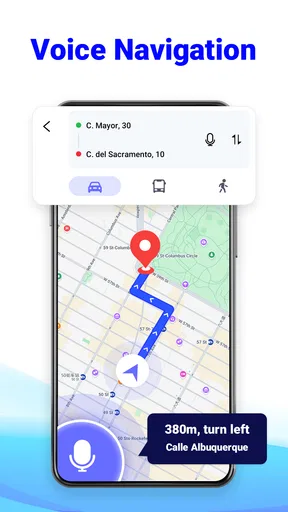
Its emphasis on voice guidance is practical when I am driving alone. Setting a destination while parked, then listening for directions, is a better workflow than repeatedly glancing down at a screen. If I am walking around a new area or riding as a passenger, the map view can help me orient myself; behind the wheel, I would keep interaction to a minimum. The app is free, which makes it easier to try for occasional trips, but I would still test the route and voice guidance on a familiar drive before depending on it somewhere remote.
Where a navigation app earns its place
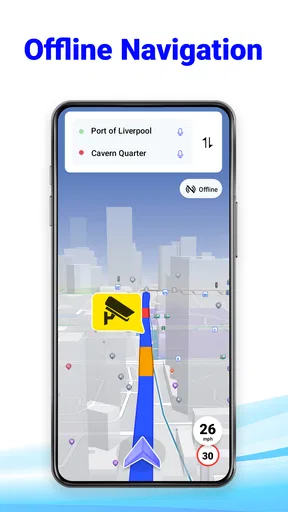
The strongest reason to consider this particular app is its combination of navigation modes and driving-related alerts. Offline GPS can be valuable on a route where mobile coverage is unreliable, while voice directions help reduce the need to study the display. Those advantages work best when prepared in advance: check the destination and any offline map needs before setting off, and do not assume an offline setup will automatically include every road or detail you might want.
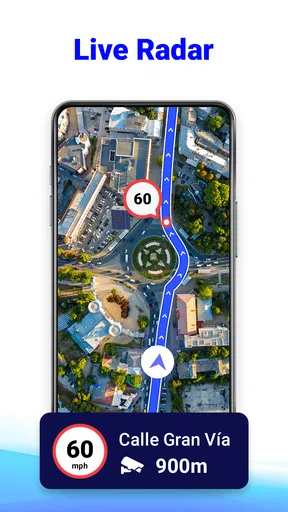
The speed-camera radar element is another reason some drivers may find the app appealing, but I treat any alert as a prompt to pay attention, not as a guarantee that every camera or hazard will be shown. Road layouts and conditions change, and a navigation aid cannot replace posted limits or careful driving. The best use of this feature is as an extra reminder to stay alert, rather than a reason to relax or focus on the screen.
Who should try it—and who may prefer another option
I can see this being a useful fit for drivers who want voice-led directions and offline navigation in one place, especially if they sometimes travel beyond familiar streets. It may also suit someone who wants to try a dedicated route planner without paying upfront. The developer, MobApp - Phone Locator GPS Location, lists it among Maps & Navigation apps; its average rating is 4.8 from around 9,300 ratings, and it has over 500,000 installs. Those figures suggest that plenty of people have tried it, but they do not tell me whether its routes or alerts will suit a particular local commute.
If I already rely on a navigation app whose maps, route choices and traffic handling I know well, I would not switch during an important journey just for the radar feature. I would compare the suggested routes on a short, familiar trip first. Drivers who need highly specialized routing, such as strict vehicle-size restrictions or detailed commercial-vehicle planning, should choose a tool built around those needs rather than assume a general GPS planner will cover them. And if you prefer a minimal map with no extra alerts, a simpler alternative may feel calmer.
Worth Reading Before You Choose

Flipboard Shows What News Apps Must Do Beyond the Feed

Switching to Android Auto Means Rethinking Your Driving Routine

Google Calendar Makes a Crowded Week Easier to Manage

Ludo King Makes the Most of the Minutes Between Plans

Baby Panda World Brings Quick Play to Modern Phones, but Its Game Library Feels Busy

ESPN’s Live Game View Makes Following Close Games Easier
A realistic trip and a few sensible checks
Picture leaving after work for a friend’s home across town, with a stretch of unfamiliar roads on the way. I would enter the destination while parked, look over the proposed route, and start voice guidance before pulling away. If the journey crosses an area with weak reception, I would prepare offline navigation beforehand rather than waiting until the signal drops. On the road, I would treat radar or hazard notices as supporting cues and follow the signs and conditions in front of me.
That routine also answers a practical question: can I use it when coverage is poor? Offline GPS is part of the app’s offering, but the useful preparation happens before the trip. Another question is whether voice guidance makes it safe to operate while driving. It helps with directions, but it is not permission to handle the phone; plan the route while stationary and keep attention on the road. For anyone wondering whether an alert means a camera or hazard is definitely present, I would not interpret it that way. Treat alerts cautiously and obey the posted rules.
Getting Started with the App
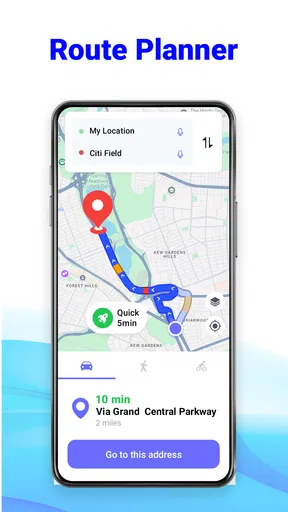
Diving into GPS Route Planner: Radar Map is pretty straightforward. Upon opening the app, you’re greeted with a clean and user-friendly interface. No clutter, just a simple search bar and a map ready to plot your adventure. I found it super easy to punch in my destination, and the app quickly calculated the best routes available. One of the coolest features? It updates routes based on real-time traffic conditions, which is a lifesaver when you’re running late.
Standout Features
What sets this app apart is its radar map functionality. It’s not just about getting from point A to B; it’s about doing so safely. The radar feature alerts you to speed traps and road hazards, which feels like having a co-pilot with a sixth sense. I tested this on my commute, and it accurately highlighted areas where I needed to keep an eye out.
Another highlight is the offline maps. Imagine being in the middle of nowhere with zero cell service—yep, been there. Downloading maps in advance ensures you’re never left in the lurch. The app also supports voice navigation, which is a godsend when driving solo and needing to keep both hands on the wheel.
Ease of Use
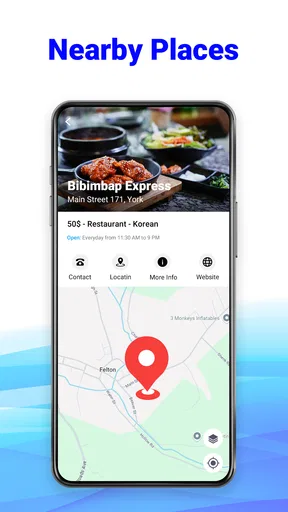
Let’s talk about usability. The app is designed with the user in mind, offering seamless integration with your phone’s existing contacts and calendar events. Planning a trip to a friend's place? No need to manually enter addresses—just select from your contacts. I found the search function to be incredibly responsive, and the voice commands worked without a hitch.
Personal Experience
On a personal note, one thing I love about the app is its ability to sync with my music apps. There’s nothing like cruising down the highway with your favorite playlist, and this app makes it a breeze to switch tracks without taking your eyes off the road. It’s little touches like these that enhance the driving experience.
Performance, limits and version
My overall impression is that the app is intended to get a route on screen quickly and then let voice directions do much of the work. I would not judge navigation speed from one successful search alone: a route can calculate promptly and still need a driver to assess whether it makes sense for the time of day or the roads ahead. The traffic-aware rerouting described in the app’s experience can be valuable when plans change, but I still recommend checking an unfamiliar diversion when safely stopped rather than making a sudden turn because the screen changed.
Heavy use is where the combination of map display, GPS, spoken directions and alerts becomes most relevant. A long drive with the screen active is a different workload from looking up a destination at home. If your phone is already low on battery, prepare the route before leaving, use voice guidance where it helps, and keep the display interaction brief. I would also avoid opening menus while moving. These are sensible navigation habits, not a promise that any particular device will last a full trip without charging.
For reliability, I would separate the app’s role from the phone’s connection and location signal. Offline maps are a useful safeguard when mobile service is poor, but they do not remove the need to prepare: choose the area you expect to need before you lose coverage. If a route or alert seems questionable, use road signs and your judgement, and pull over safely before reviewing alternatives. That is a more dependable recovery plan than trying to troubleshoot while driving.
Device age matters, too. The app supports Android 5.0 and later, so it can run on a broad range of Android devices, though a minimum operating-system requirement alone cannot guarantee equally smooth performance on every phone. Its current version is 1.4.1. I would keep the app and downloaded navigation material ready before a major trip, especially if the phone is older or storage is limited; offline maps can be useful, but they also need room on the device. It is rated for Everyone, making it broadly accessible, though the driving context still calls for adult attention and safe phone use.
Compared with the usual choices, this planner’s appeal is the bundle: route guidance plus offline use and radar-style driving alerts. A familiar mainstream map app may be the better choice if you already trust its local route suggestions and want to avoid learning a different interface. A simpler GPS tool may suit drivers who do not want extra alerts, while specialist navigation is more appropriate for tightly defined vehicle or work routes. I see this app as a practical option to test alongside—not blindly in place of—the tool you already know.
What I would check before depending on it
Before a trip, I would search for the destination while stationary, make sure the route looks plausible, and decide whether offline preparation is needed. I would test voice guidance on a familiar road and learn how to pause or adjust navigation while parked. That short trial helps answer the question many people have after installing a navigator: will it fit my routine? If the screen, route style or alerts feel distracting, it is better to discover that on a local drive than during a demanding journey.
One trade-off is that extra information can be helpful without always being necessary. Camera and hazard alerts may support awareness, but they can also add another reason to glance at the display if the driver tries to monitor every notification. I would let spoken directions carry the routine work and reserve map checks for safe stops. Likewise, offline capability is most useful for a known stretch with weak service; for a trip that depends on changing traffic information, I would not assume an offline map offers the same live context as a connected route.
The app was released on October 25, 2023, and its free entry point makes a low-stakes trial possible. Its average rating and adoption are encouraging context, not a substitute for checking how it behaves on your roads and handset. I would start with a short commute or a familiar errand, then decide whether its route planning and alert style are worth making part of a longer-drive routine. That is especially sensible if you depend on navigation every day and cannot afford to discover a mismatch halfway through an important trip.
Final Thoughts
So, should you download GPS Route Planner: Radar Map? If you’re someone who values a reliable navigation tool that goes beyond just giving directions, this app is a solid choice. With its array of features designed to keep you safe and on track, it’s definitely worth a shot. Plus, the ability to avoid speed traps and road hazards is a huge bonus. To sum it up, this app makes every journey feel like a well-planned adventure, and who doesn’t want that?
Pros
- User-friendly interface with intuitive design.
- Accurate real-time traffic updates.
- Offline maps available for remote areas.
- Customizable route options for travelers.
- Integrates with calendar for scheduled trips.
Cons
- High battery consumption during navigation.
- Frequent ads in the free version.
- Occasional GPS signal drops in cities.
- Limited voice guidance language options.
- Some users report slow map loading.
FAQs for GPS Route Planner: Radar Map
What features does GPS Route Planner: Radar Map offer?
GPS Route Planner: Radar Map provides comprehensive navigation tools, including real-time traffic updates, route optimization, and voice-guided directions. It also features a radar map for detecting speed cameras and traffic signals, ensuring you stay informed on the road. The app's user-friendly interface makes it accessible for all users.
Is GPS Route Planner: Radar Map available offline?
Yes, GPS Route Planner: Radar Map offers offline maps for users who want to navigate without an internet connection. You can download maps of specific regions in advance, allowing you to access essential navigation features even when you're offline. This is especially useful for travelers in areas with poor network coverage.
How accurate is the real-time traffic information?
The app uses live data from multiple sources to provide highly accurate real-time traffic updates. It helps in identifying traffic jams, road closures, and accidents, allowing users to choose the fastest route available. However, the accuracy may vary depending on the availability and quality of the data in different regions.
Is GPS Route Planner: Radar Map free to use?
GPS Route Planner: Radar Map offers a free version with basic features, but there might be in-app purchases or a premium version available. The premium version typically includes advanced features like ad-free usage, enhanced map details, and additional radar alerts. Users can choose based on their navigation needs.
What are the system requirements for GPS Route Planner: Radar Map?
The app requires a device running Android 5.0 or iOS 11.0 and above, ensuring compatibility with most modern smartphones and tablets. It is optimized for performance to provide smooth navigation without draining the battery excessively. Ensure your device meets these requirements for the best user experience.


